
AWS Rightsizing in India: Right-Size Instances for Mumbai and Hyderabad Regions

Country Manager, India
AI, Manufacturing, DevOps, and Managed Services. 17+ years across Manufacturing, E-commerce, Retail, NBFC & Banking
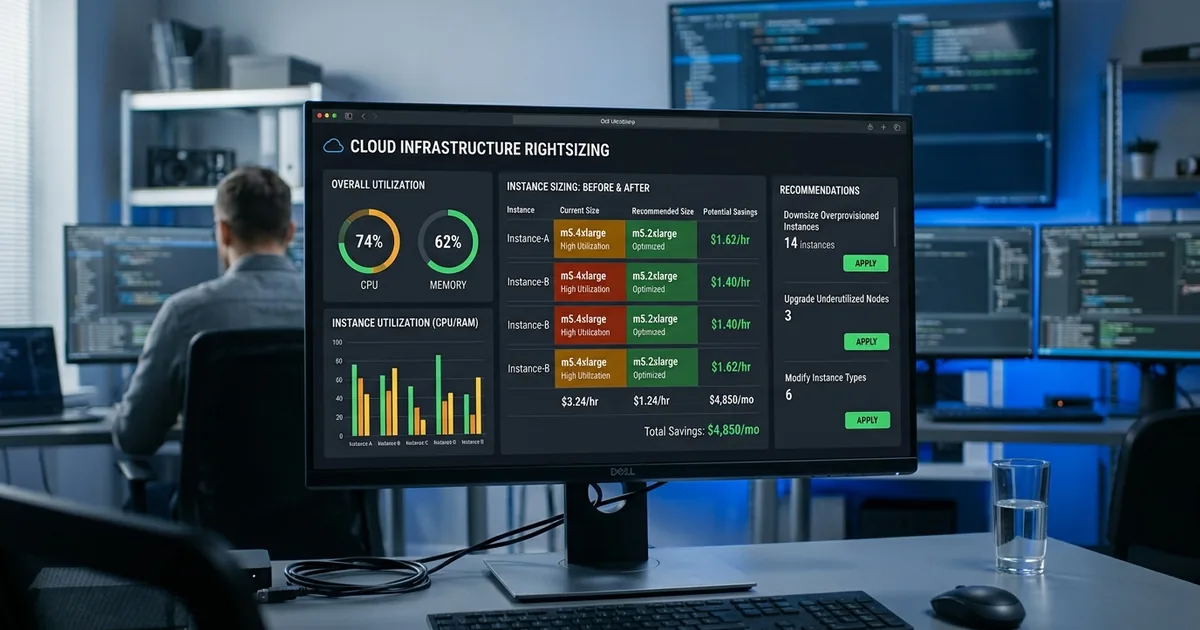
Why Is AWS Rightsizing Critical for Indian Cloud Deployments?
AWS rightsizing means matching instance types and sizes to actual workload requirements, eliminating over-provisioning without sacrificing performance. According to Flexera's 2025 State of the Cloud Report, the average organisation wastes 32% of its cloud spend, and over-provisioned instances are the primary cause. For Indian companies running workloads in ap-south-1 (Mumbai) and ap-south-2 (Hyderabad), rightsizing is the foundation of any cost optimisation strategy.
Key Takeaways
- AWS rightsizing can reduce EC2 costs by 30-50% without impacting application performance
- AWS Cost Explorer and Compute Optimizer are the two primary tools for rightsizing recommendations
- 32% of cloud spend is wasted on idle or over-provisioned resources (Flexera, 2025)
- Always rightsize before purchasing Reserved Instances or Savings Plans
India's two AWS regions provide a full range of instance families, from general-purpose M-series to compute-optimised C-series and memory-optimised R-series. The challenge for Indian enterprises isn't availability, it's selection. Many companies provisioned their infrastructure during migration, chose "safe" oversized instances, and never revisited those choices. This guide walks through the process of rightsizing specifically for India-region workloads.
cloud cost optimization services
What Tools Does AWS Provide for Rightsizing?
AWS offers two primary rightsizing tools: Cost Explorer's rightsizing recommendations and AWS Compute Optimizer. AWS Compute Optimizer analyses 14 days of CloudWatch metrics and produces specific instance type recommendations. AWS states that Compute Optimizer can identify up to 25% savings on EC2 alone for the average customer. Both tools are free and require minimal setup.
AWS Cost Explorer Rightsizing Recommendations
Cost Explorer analyses your EC2 usage and identifies instances that are consistently underutilised. It flags instances where CPU averages below 40% and network throughput is low relative to the instance's capability. Recommendations appear in the Cost Explorer console under "Rightsizing Recommendations" and include estimated savings per instance in USD (convertible to INR at current exchange rates).
AWS Compute Optimizer
Compute Optimizer goes deeper. It analyses CPU, memory (via CloudWatch agent), network, and disk I/O to recommend optimal instance families and sizes. It can suggest moving from an m5.xlarge to a c6g.large if your workload is compute-bound, not just downsizing within the same family. For Indian enterprises, Compute Optimizer's Graviton recommendations are particularly valuable since Graviton instances cost 20% less.
[IMAGE: AWS Compute Optimizer dashboard showing rightsizing recommendations for EC2 instances in Mumbai region - aws compute optimizer rightsizing]
Need expert help with aws rightsizing in india?
Our cloud architects can help you with aws rightsizing in india — from strategy to implementation. Book a free 30-minute advisory call with no obligation.
How Do You Identify Over-Provisioned Instances in Mumbai and Hyderabad?
[PERSONAL EXPERIENCE] In our experience with Indian enterprise migrations, 40-60% of EC2 instances are over-provisioned by at least one size category. The most common pattern: a team provisions m5.2xlarge during development, testing under artificial load succeeds, and the same size persists into production running at 15% CPU. Identifying these instances is straightforward with the right metrics.
Key Metrics to Monitor
Focus on four metrics: average CPU utilisation, peak CPU utilisation, network bandwidth consumption, and memory usage (requires the CloudWatch agent). Instances averaging below 20% CPU with peaks below 50% are almost always candidates for downsizing. Memory-bound applications may show high memory but low CPU, suggesting a shift from M-series to R-series rather than a simple downsize.
The 14-Day Observation Window
Don't rightsize based on a single day's metrics. Use at least 14 days of CloudWatch data to account for weekly patterns. Indian businesses often have distinct weekday versus weekend usage profiles. Some have monthly billing cycles that spike resource usage around month-end. The 14-day window captures these patterns and prevents premature downsizing.
What Is the Right Approach to Graviton Migration in India?
AWS Graviton processors (Arm-based) deliver up to 40% better price-performance than equivalent x86 instances, according to AWS (2026). Graviton instances are available in both Mumbai and Hyderabad regions across M7g, C7g, R7g, and T4g families. For Indian companies running Linux workloads, Graviton migration is one of the highest-impact rightsizing moves available.
Compatibility Considerations
Most Linux applications run on Graviton without modification. Java, Python, Node.js, and .NET Core applications typically work immediately. The exceptions are applications with x86-specific compiled binaries or assembly code. Test your application on a Graviton instance in staging before migrating production. For containerised workloads, multi-architecture Docker images handle the transition automatically.
Graviton Pricing in India Regions
In ap-south-1, a m7g.xlarge (Graviton) costs approximately INR 10,200/month compared to INR 12,800/month for m6i.xlarge (Intel). That's a 20% savings before any commitment discounts. Stack a Compute Savings Plan on top, and total savings from x86 on-demand to Graviton with Savings Plan can exceed 55%. This makes Graviton the single most impactful rightsizing decision for eligible workloads.
[CHART: Table - Price comparison of Intel vs Graviton instances for common sizes in Mumbai region in INR - AWS Pricing 2026]
How Do You Execute a Rightsizing Plan Without Downtime?
Rightsizing requires instance type changes, which mean stopping and starting the instance. For Indian production workloads, this must be done carefully. AWS documentation confirms that changing instance types preserves the root EBS volume and private IP, but requires a brief stop/start cycle. Planning this during low-traffic windows minimises impact.
Step-by-Step Rightsizing Process
First, enable the CloudWatch agent for memory metrics if not already active. Second, analyse 14+ days of data using Compute Optimizer. Third, create a prioritised list sorted by estimated savings. Fourth, schedule changes during maintenance windows, typically late-night IST for production systems. Fifth, resize, verify application health, and monitor for 48 hours before moving to the next instance.
Using Auto Scaling Groups for Zero-Downtime Changes
If your instances run behind an Auto Scaling Group and load balancer, you can rightsize by updating the launch template with the new instance type and performing a rolling replacement. The ASG launches new instances with the smaller type, drains traffic from old instances, and terminates them. Zero-downtime rightsizing becomes routine rather than risky.
What Common Rightsizing Mistakes Should Indian Teams Avoid?
[UNIQUE INSIGHT] The most dangerous rightsizing mistake isn't downsizing too aggressively. It's rightsizing after buying commitments. If you purchase a three-year Savings Plan based on over-provisioned usage, then rightsize, your commitment exceeds your actual spend. Always rightsize first, stabilise for 30 days, then purchase commitment discounts. This sequencing error costs Indian enterprises thousands of dollars annually.
Ignoring Memory Metrics
The default CloudWatch metrics don't include memory utilisation. Without the CloudWatch agent, you're making rightsizing decisions with incomplete data. An instance showing 10% CPU might be using 90% of its memory. Downsizing it would cause out-of-memory crashes. Install the CloudWatch agent on all instances before starting any rightsizing initiative.
Rightsizing Stateful Workloads Without Testing
Databases, message queues, and caching layers are sensitive to instance type changes. Changing from a memory-optimised to general-purpose instance can devastate database performance. Always benchmark stateful workloads on the target instance type before production changes. Use read replicas or blue-green deployments to test safely.
How Does Rightsizing Fit with Other Cost Optimisation Strategies?
Rightsizing is step one of a broader cloud cost optimization strategy. The FinOps Foundation (2025) recommends a sequence: rightsize, then commit, then automate. Rightsizing reduces your baseline spend. Commitment discounts (Savings Plans or RIs) lock in lower rates on that optimised baseline. Automation (scheduling, auto-scaling) handles variable workloads.
The Rightsize-Then-Commit Sequence
Rightsize all instances and monitor for 30 days. Verify that performance is stable. Then analyse your new baseline usage and purchase Savings Plans or Reserved Instances sized to that optimised level. This sequence ensures your commitments match reality. Reversing the order, committing before rightsizing, leads to over-commitment and wasted spend.
Combining with Spot Instances
After rightsizing, evaluate which workloads can tolerate interruption. Batch processing, CI/CD pipelines, and stateless web tiers are often eligible for Spot Instances. Spot pricing in India regions offers 60-90% discounts over on-demand. Combined with rightsizing, this creates a layered cost structure: reserved baseline, on-demand for variable load, and Spot for interruptible work.
[IMAGE: Flowchart showing the rightsizing workflow from metric collection to execution to commitment purchase - aws rightsizing workflow]
Frequently Asked Questions
How often should we rightsize AWS instances?
Review rightsizing recommendations quarterly. Application patterns change as features launch, user bases grow, and architectures evolve. A quarterly review ensures your instances stay matched to actual requirements. Set a calendar reminder and make it part of your cloud operations cadence alongside security and compliance reviews.
Does rightsizing cause downtime?
Changing an instance type requires a stop/start cycle, which typically takes 2-5 minutes. For instances behind Auto Scaling Groups and load balancers, you can achieve zero-downtime rightsizing through rolling replacements. Plan changes during maintenance windows for standalone instances running production workloads.
Is AWS Compute Optimizer free?
The standard tier is free and provides recommendations based on CloudWatch metrics. The enhanced tier (Compute Optimizer with extended metrics) costs $0.0003360 per resource per hour and provides recommendations based on three months of data instead of 14 days. Most Indian enterprises start with the free tier and upgrade for critical workloads.
Should I rightsize before or after buying Savings Plans?
Always rightsize before purchasing any commitment discount. Rightsizing reduces your baseline spend, which means your Savings Plan commitment should be smaller. Buying commitments on over-provisioned infrastructure locks in waste. See our AWS Savings Plans guide for details on calculating the right commitment after rightsizing.
Start Rightsizing Your India-Region Workloads Today
Rightsizing is the highest-return, lowest-risk cost optimisation activity for Indian AWS deployments. Enable the CloudWatch agent for memory metrics. Run Compute Optimizer across your accounts. Prioritise changes by estimated savings. Execute during maintenance windows and validate with 48-hour monitoring. The tools are free and the process is well-documented.
Once your instances are right-sized, move to commitment discounts and automation. The compound effect of rightsizing plus Savings Plans plus Spot Instances can reduce total compute costs by 60-70% compared to an unoptimised, on-demand baseline. That's a material improvement in unit economics for any Indian company operating at scale in the cloud.
For hands-on delivery in India, see managed AWS for India.
Related Services
About the Author

Country Manager, India
Praveena leads Opsio's India operations, bringing 17+ years of cross-industry experience spanning AI, manufacturing, DevOps, and managed services.
Editorial standards: This article was written by a certified practitioner and reviewed by our engineering team. We revise it when the technology or regulation it covers changes; the dates above show the latest update. Opsio maintains editorial independence — we recommend solutions on technical merit, not commercial relationships.