
Azure Cost Management for Indian Enterprises: Step-by-Step Guide

Country Manager, India
AI, Manufacturing, DevOps, and Managed Services. 17+ years across Manufacturing, E-commerce, Retail, NBFC & Banking
Why Should Indian Enterprises Care About Azure Cost Management?
Indian enterprises waste an estimated 32% of their cloud spend on unused or idle resources, according to Flexera's 2025 State of the Cloud Report. Azure Cost Management provides the visibility and controls needed to reclaim that waste. For companies operating from Mumbai and Pune data centres, understanding these tools isn't optional, it's a financial imperative.
Key Takeaways
- Azure Cost Management + Billing is free for all Azure subscribers and covers budgets, alerts, and recommendations
- Indian enterprises can reduce cloud waste by 20-30% using budgets and advisor recommendations (Flexera, 2025)
- Tagging discipline and resource group design are foundational to cost visibility
- Combining reservations with auto-scaling delivers the strongest savings for INR-billed workloads
Azure's cloud footprint in India has grown significantly since the launch of the Central India (Pune) and South India (Chennai) regions. With IDC estimating India's public cloud services market reached $13.7 billion in 2025, cost governance has become a board-level concern. This guide walks you through every step of configuring Azure Cost Management for an India-focused deployment.
cloud cost optimization services
What Is Azure Cost Management + Billing?
Azure Cost Management + Billing is a built-in toolset that helps organisations monitor, allocate, and optimise their Azure spending. Microsoft reports that customers using Cost Management features save an average of 20% within the first 90 days (Microsoft Azure Blog, 2025). The service is free for every Azure subscription, making it accessible to startups and large Indian conglomerates alike.
The platform combines cost analysis dashboards, budget alerts, advisor recommendations, and export capabilities into a single pane. For Indian enterprises billing in INR through Microsoft's India entity, costs display in the local currency by default. This removes exchange rate confusion that plagues many multi-cloud setups.
Core Components at a Glance
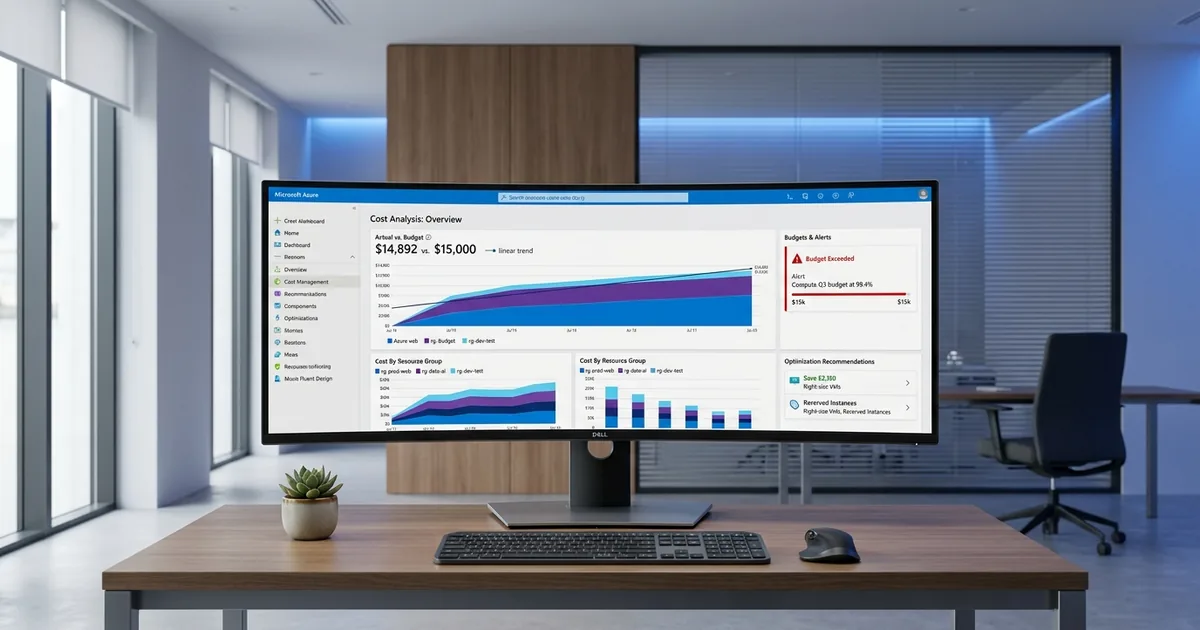
Cost Analysis lets you slice spending by resource group, subscription, tag, or service type. Budgets set spending caps with email or action group alerts when thresholds hit 50%, 80%, or 100%. Azure Advisor surfaces right-sizing and reservation purchase recommendations. Exports push daily or monthly cost data to Azure Storage for integration with Power BI or custom dashboards.
[CHART: Table - Core Azure Cost Management components and their functions - Microsoft documentation]
Need expert help with azure cost management for indian enterprises?
Our cloud architects can help you with azure cost management for indian enterprises — from strategy to implementation. Book a free 30-minute advisory call with no obligation.
How Do You Set Up Azure Cost Management for India Regions?
Setting up cost governance for India regions requires attention to billing scope, currency, and regional pricing. Azure's Central India region in Pune offers VM pricing roughly 15-25% lower than US East for equivalent SKUs (Azure Pricing Calculator, 2026). Configuring Cost Management correctly from day one prevents billing surprises.
Step 1: Verify Your Billing Account Type
Indian enterprises typically use either a Microsoft Customer Agreement (MCA) or an Enterprise Agreement (EA). MCA is common for mid-size firms, while EA suits organisations committing over $100,000 annually. Your billing account type determines which Cost Management features are available. Check this in the Azure Portal under Cost Management + Billing, then Properties.
Step 2: Organise Subscriptions and Resource Groups
Create subscriptions for each major business unit or environment (production, staging, development). Within each subscription, define resource groups by application or team. This hierarchy directly impacts your ability to analyse costs at meaningful levels. A flat structure with everything in one resource group makes cost attribution nearly impossible.
Step 3: Implement a Tagging Strategy
Tags are the backbone of cost allocation. Apply tags for cost centre, environment, owner, and project at a minimum. Use Azure Policy to enforce mandatory tags on resource creation. Without consistent tagging, you're relying on resource group names alone, which rarely tells the full cost story for Indian enterprises running hundreds of workloads.
[IMAGE: Azure portal cost analysis dashboard showing INR currency and resource group breakdown - azure cost management dashboard india]
How Should You Configure Budgets and Alerts?
Budgets are the most actionable feature in Azure Cost Management. Organisations that set budgets with automated alerts catch overspending 60% faster than those relying on manual reviews, according to a Flexera survey of 750 enterprises (2025). For Indian teams, setting INR-denominated budgets aligned with quarterly planning cycles works best.
Creating Your First Budget
Navigate to Cost Management, then Budgets, then Add. Select the scope (subscription or resource group). Choose a monthly or quarterly reset period. Set the amount in INR based on your expected spend. Add alert conditions at 50%, 80%, and 100% of the budget. Assign email recipients or connect to an Action Group for Slack or Teams notifications.
Advanced Budget Automation
Connect budgets to Azure Logic Apps or Azure Functions for automated responses. When spending hits 90%, an automation can scale down non-production VMs, pause Azure Synapse pools, or send a detailed Slack message to the finance team. This approach transforms budgets from passive alerts into active governance.
What Role Does Azure Advisor Play in Cost Optimisation?
Azure Advisor analyses your resource usage patterns and produces specific recommendations. Microsoft claims Advisor recommendations could save the average enterprise $15,000-$50,000 annually on compute alone (Microsoft Learn, 2025). For Indian workloads, the most common recommendations involve right-sizing underused VMs and purchasing reserved instances.
Advisor's cost recommendations cover virtual machines, App Services, Azure SQL, Cosmos DB, and more. Each recommendation shows estimated monthly savings in your billing currency. The tool is particularly valuable for Indian enterprises that provisioned generously during initial migration and haven't revisited sizing since.
Azure Advisor cost optimization
Acting on Advisor Recommendations
Review Advisor recommendations weekly, not monthly. Assign ownership of each recommendation to a specific team member with a deadline. Track accepted versus dismissed recommendations in a shared dashboard. Over time, this creates an institutional habit of continuous cost improvement rather than reactive fire-fighting when bills arrive.
How Can Tagging and Governance Policies Reduce Waste?
Proper tagging alone can reduce cloud cost allocation errors by up to 40%, based on findings from the FinOps Foundation's 2025 report. For Indian enterprises managing workloads across Central India and South India regions, tags provide the only reliable way to attribute costs to specific business units, clients, or projects.
Enforcing Tags with Azure Policy
Azure Policy can deny resource creation if mandatory tags are missing. Create a policy initiative that requires "CostCenter", "Environment", "Owner", and "Project" tags. Assign it at the management group level so every subscription inherits the rules. This prevents the common problem where developers create resources without any cost attribution.
Combining Tags with Cost Analysis Views
Once tags are consistent, create saved views in Cost Analysis filtered by each tag value. Share these views with department heads so they can self-serve their own cost data. This reduces dependency on the cloud team for monthly chargeback reports and empowers business units to own their spending.
[CHART: Bar chart - Monthly cost breakdown by department tags for a sample Indian enterprise - internal example]
What Are Common Azure Cost Management Mistakes Indian Enterprises Make?
[UNIQUE INSIGHT] Many Indian enterprises treat Azure Cost Management as a reporting tool rather than a governance platform. In our experience working with mid-size firms in Bengaluru and Hyderabad, three mistakes surface repeatedly: ignoring reserved instance recommendations, failing to tag resources at creation time, and reviewing costs monthly instead of weekly.
Mistake 1: No Reservation Strategy
Reserved instances can cut compute costs by up to 72% for one-year or three-year commitments. Yet many Indian firms avoid them, fearing lock-in. The reality is that production workloads running 24/7 almost always justify reservations. Even a partial commitment on your most stable VMs delivers significant savings.
Mistake 2: Orphaned Resources
Unattached managed disks, idle public IPs, and forgotten snapshots accumulate quietly. They don't generate alerts because individually they're small charges. Collectively, they can represent 5-10% of monthly spend. Use Azure Advisor and periodic resource audits to identify and delete these.
Mistake 3: No FinOps Culture
Cost management isn't a one-time project. It requires ongoing attention from engineering, finance, and leadership. Indian enterprises that establish a FinOps practice, even informally, see faster improvements than those that delegate cost entirely to IT operations.
How Do You Export and Analyse Cost Data Beyond the Portal?
Azure Cost Management supports scheduled exports to Azure Blob Storage in CSV format. For enterprises processing large volumes of data, exporting to a storage account and connecting Power BI produces richer analysis than the portal alone. About 45% of mature cloud users build custom dashboards outside native tools (FinOps Foundation, 2025).
Setting Up Automated Exports
Go to Cost Management, then Exports, then Add. Choose the scope, file format (CSV), and frequency (daily or monthly). Specify a storage account and container. Once exported, use Azure Data Factory or a simple Python script to transform and load the data into a SQL database or Power BI dataset for custom reporting.
Building an INR Cost Dashboard
Power BI's Azure Cost Management connector pulls data directly from your billing scope. Create visuals showing month-over-month trends, top-spending resource groups, and tag-based breakdowns, all in INR. Share the dashboard with finance and engineering leads for collaborative cost reviews.
[IMAGE: Power BI dashboard showing Azure cost trends in INR with resource group breakdown - azure cost power bi dashboard]
Frequently Asked Questions
Is Azure Cost Management free for all Azure customers?
Yes. Azure Cost Management + Billing is included at no extra charge with every Azure subscription. You get cost analysis, budgets, alerts, recommendations, and data exports without paying anything beyond your standard Azure resource costs.
Can I view Azure costs in Indian Rupees (INR)?
If your billing account is set up through Microsoft's India entity, costs display in INR by default. Enterprise Agreement and Microsoft Customer Agreement accounts billed in India both support INR. You can also convert currencies manually in Power BI for multi-region reporting.
How often should we review Azure costs?
Weekly reviews catch anomalies faster than monthly ones. Set up budget alerts for real-time notifications, and schedule a formal weekly review with engineering and finance stakeholders. Monthly reviews should focus on trends and strategic decisions like reservation purchases.
What is the difference between Azure Cost Management and Azure Advisor?
Cost Management focuses on visibility, budgets, and reporting. Azure Advisor provides specific optimisation recommendations, including right-sizing VMs and buying reservations. They complement each other: use Cost Management to understand spending, and Advisor to act on it.
Does Azure Cost Management work with multi-cloud setups?
Azure Cost Management supports AWS cost data through a connector, enabling a single view of Azure and AWS spending. GCP integration requires third-party tools. For Indian enterprises running hybrid or multi-cloud, this consolidated view simplifies cloud cost optimization significantly.
Taking Control of Azure Costs in India
Azure Cost Management gives Indian enterprises the tools to move from reactive bill-paying to proactive cost governance. Start by verifying your billing scope and implementing a tagging strategy. Set budgets with automated alerts. Review Azure Advisor recommendations weekly. Export data for custom dashboards that finance and engineering teams can share.
The 32% average waste figure from Flexera's research doesn't have to apply to your organisation. With disciplined tagging, intelligent budgets, and a commitment to regular reviews, Indian enterprises can reclaim significant portions of their Azure spend. The tools are free. The discipline is what creates the savings.
For hands-on delivery in India, see Opsio's managed Azure practice.
Related Services
About the Author

Country Manager, India
Praveena leads Opsio's India operations, bringing 17+ years of cross-industry experience spanning AI, manufacturing, DevOps, and managed services.
Editorial standards: This article was written by a certified practitioner and reviewed by our engineering team. We revise it when the technology or regulation it covers changes; the dates above show the latest update. Opsio maintains editorial independence — we recommend solutions on technical merit, not commercial relationships.