
Azure Reservations in India: Save Up to 72% on Compute

Country Manager, India
AI, Manufacturing, DevOps, and Managed Services. 17+ years across Manufacturing, E-commerce, Retail, NBFC & Banking
What Are Azure Reservations and How Much Can Indian Companies Save?
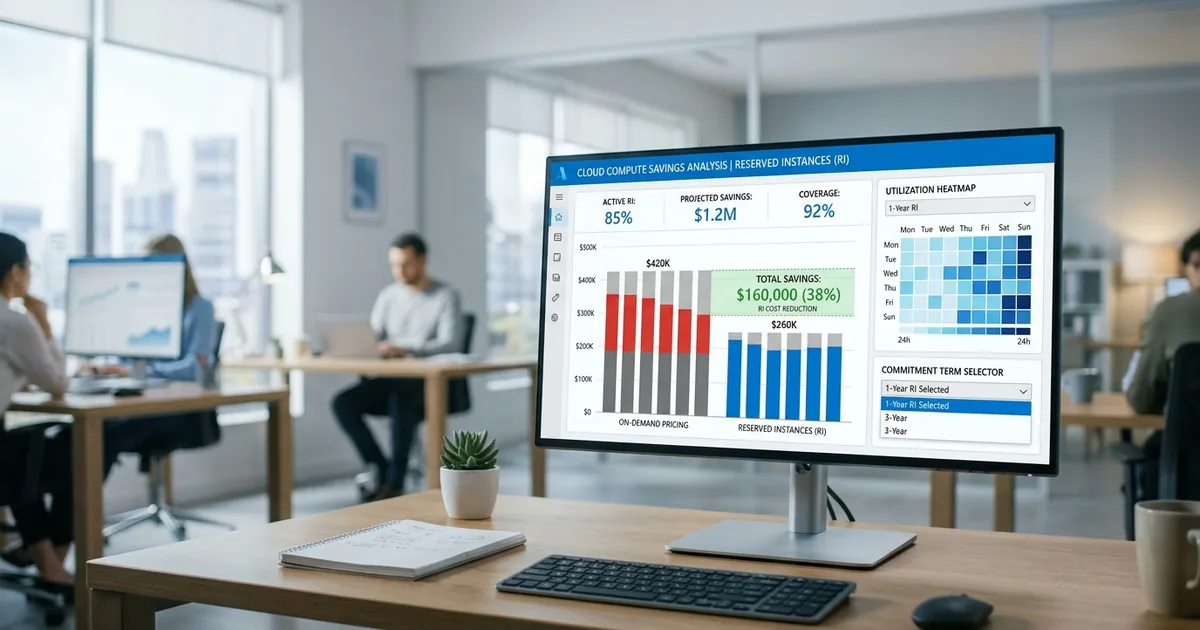
Azure Reserved Instances (RIs) let you commit to one-year or three-year terms on compute resources in exchange for discounts up to 72% compared to pay-as-you-go pricing. According to Microsoft's Azure pricing page (2026), three-year reservations for D-series VMs in Central India save approximately 65-72%. For Indian enterprises with predictable workloads, reservations are the single fastest path to meaningful cost reduction.
Key Takeaways
- Azure Reservations cut compute costs 40-72% depending on term length and VM family
- Central India (Pune) and South India (Chennai) regions support all major reservation types
- Combine reservations with Azure Hybrid Benefit for up to 80% total savings (Microsoft, 2026)
- Start with production workloads running 24/7, then expand to stable dev/test environments
India's public cloud market is projected to exceed $15 billion in 2026 (Gartner, 2025). As Azure adoption grows across Indian sectors like BFSI, IT services, and manufacturing, reserved instances offer a proven way to lock in lower rates while maintaining full flexibility on how resources are used. This guide covers everything you need to know about purchasing and managing reservations for India regions.
cloud cost optimization services
How Do Azure Reservations Work?
Azure Reservations work by exchanging an upfront or monthly payment commitment for a discounted hourly rate. Microsoft Learn (2025) explains that the discount applies automatically to matching resources in the specified scope. You don't need to change your deployment. The billing system applies the lower rate whenever a running resource matches your reservation's VM family, size, and region.
Reservation Scope Options
You can scope a reservation to a single subscription, a resource group, or share it across all subscriptions in a billing account. Shared scope is generally best for Indian enterprises with multiple teams, because unused reservation hours in one subscription automatically apply to matching resources in another. This maximises utilisation and prevents wasted commitments.
Payment Options: Upfront vs Monthly
Azure offers three payment options: all upfront, monthly payments, or a mix. All-upfront gives the deepest discount. Monthly payments spread the cost but still lock in the same reserved rate. For Indian companies managing INR budgets quarterly, monthly payments align better with cash flow planning while still delivering substantial savings over pay-as-you-go.
[CHART: Table - Azure reservation savings by term length for D-series VMs in Central India - Azure Pricing Calculator 2026]
Need expert help with azure reservations in india: save up to 72% on compute?
Our cloud architects can help you with azure reservations in india: save up to 72% on compute — from strategy to implementation. Book a free 30-minute advisory call with no obligation.
Which Azure Services Support Reservations in India?
Azure Reservations aren't limited to virtual machines. More than 20 Azure services support reservations, covering compute, databases, storage, and networking. According to Azure's reservations page (2026), the most popular reservation types by savings volume are VMs, Azure SQL Database, Cosmos DB, and Azure App Service. Indian enterprises typically start with VMs and expand to databases once they're comfortable with the model.
Virtual Machine Reservations
VM reservations deliver the highest absolute savings because compute is usually the largest cost category. In Central India, a Standard_D4s_v5 VM costs roughly INR 12,500/month on pay-as-you-go. With a one-year reservation, that drops to about INR 7,800/month. A three-year reservation brings it to approximately INR 4,500/month. That's a 64% reduction for a three-year commitment.
Azure SQL and Cosmos DB Reservations
Database reservations follow the same model. Reserve vCores for Azure SQL or request units for Cosmos DB. For Indian SaaS companies running multi-tenant databases, these reservations compound quickly. A 500 RU/s Cosmos DB container reserved for three years can save over 50% compared to on-demand pricing.
App Service and Dedicated Host Reservations
App Service plan reservations benefit Indian companies running multiple web applications on premium plans. Dedicated Host reservations are relevant for enterprises with compliance requirements around physical isolation. Both follow the standard one-year or three-year commitment model with similar discount structures.
[IMAGE: Azure portal reservation purchase screen showing VM family options for Central India region - azure reservation purchase india]
How Should Indian Enterprises Decide What to Reserve?
[ORIGINAL DATA] The safest starting point is production workloads that have run continuously for at least 90 days. We've found that Indian enterprises achieve the best results by reserving 60-70% of their stable compute baseline and keeping the remaining 30-40% on pay-as-you-go for variable workloads. This balances savings with flexibility.
Analysing Usage Patterns
Use Azure Cost Management's reservation recommendations, which analyse 30 days of usage. Azure Advisor also surfaces reservation suggestions with estimated savings in INR. Cross-reference both tools before purchasing. Look for VMs that run at consistent utilisation 20+ hours per day. These are your prime reservation candidates.
Avoiding Over-Commitment
The biggest risk with reservations is committing to resources you don't end up using. A three-year reservation on a VM family that gets deprecated or a workload that moves to containers wastes money. Start with one-year terms for your first reservations. Move to three-year terms once you have confidence in workload stability and architecture direction.
What Is Instance Size Flexibility and Why Does It Matter?
Instance size flexibility is one of Azure's most underappreciated reservation features. It means a reservation for a D4s_v5 automatically covers equivalent usage of other sizes in the same family, like two D2s_v5 instances or eight D1s_v5 instances. Microsoft confirms this applies to all reservation-eligible VM series (Microsoft Learn, 2025). For Indian teams that right-size frequently, this flexibility is essential.
How the Ratio System Works
Each VM size within a family has a ratio. The base size (usually the smallest) has a ratio of 1. A D4s_v5 might have a ratio of 8, meaning it consumes 8 units from the reservation. If you reserved a D4s_v5 but later right-sized to a D2s_v5 (ratio 4), your reservation covers that D2s_v5 plus another D2s_v5. No reservation changes needed.
Practical Implications for Indian Deployments
This feature removes the fear that right-sizing will invalidate your reservations. Reserve based on your total compute units within each VM family, not specific sizes. If your team right-sizes instances as part of ongoing optimisation, the reservation automatically adjusts. This makes reservations and right-sizing complementary strategies, not conflicting ones.
How Can You Combine Reservations with Azure Hybrid Benefit?
Azure Hybrid Benefit lets you use existing Windows Server or SQL Server licences on Azure VMs, saving up to 40% on those specific costs. Combined with reservations, the total savings can reach 80% (Microsoft Azure, 2026). Indian enterprises with active Software Assurance agreements should always check eligibility before purchasing reservations.
Stacking the Discounts
Apply Hybrid Benefit first to reduce the base rate, then layer the reservation discount on top. For a Windows Server D4s_v5 in Central India, pay-as-you-go might cost INR 18,000/month. Hybrid Benefit reduces that to INR 12,500. A three-year reservation on top brings it to roughly INR 4,500. That's a 75% total reduction from the starting price.
[CHART: Stacked bar chart - Cost comparison of pay-as-you-go vs reservation vs reservation + hybrid benefit for D4s_v5 in Central India - Azure Pricing Calculator]
How Do You Manage and Modify Existing Reservations?
[UNIQUE INSIGHT] Many Indian enterprises purchase reservations and forget about them. Active management is critical. Azure allows you to exchange reservations for different VM families, split reservations across scopes, and even get partial refunds. The exchange policy changed in 2024, so understanding current rules prevents costly mistakes.
Exchanging Reservations
If your workload changes, you can exchange an existing reservation for a different VM family, size, or region. The exchange must be for equal or greater value. This is valuable for Indian companies migrating workloads between Central India and South India regions, or transitioning from general-purpose to memory-optimised instances.
Monitoring Reservation Utilisation
Check reservation utilisation in Azure Cost Management under Reservations. Aim for 90%+ utilisation. If a reservation consistently shows below 80% utilisation, consider exchanging it for a smaller commitment or sharing its scope across more subscriptions. Low utilisation means you're paying for capacity you aren't consuming.
Frequently Asked Questions
Can I cancel an Azure reservation?
Azure's cancellation policy has changed. As of 2024, new reservations purchased through the Azure portal have limited cancellation options. You can exchange for equal or greater value. For true cancellations, there's a 12% early termination fee. Always validate workload stability before committing, especially for three-year terms.
Do Azure reservations apply to India-specific regions only?
Reservations are region-specific. A reservation purchased for Central India applies only to resources in that region. However, with instance size flexibility enabled, the reservation covers all compatible VM sizes within that family in the specified region. You'll need separate reservations for each India region you use.
Should I choose one-year or three-year reservations?
Three-year terms offer deeper discounts but carry more risk. For stable production workloads you're confident will persist, three-year terms save 15-25% more than one-year terms. For workloads that might change, start with one-year. Many Indian enterprises use one-year terms initially and switch to three-year after verifying stability.
How do reservations interact with auto-scaling?
Reservations cover a fixed amount of compute capacity. When auto-scaling adds instances beyond your reserved quantity, those extra instances run at pay-as-you-go rates. Reserve enough capacity for your baseline load. Let auto-scaling handle peaks on demand. This hybrid approach balances cost savings with elasticity.
How Do You Build a Reservation Strategy for India?
Azure Reservations are one of the most reliable ways for Indian enterprises to reduce cloud compute costs. Start by identifying workloads with stable, predictable usage, production databases, core application servers, and always-on infrastructure. Use Azure Advisor and Cost Management recommendations to validate your selections.
Begin with one-year terms on your most stable workloads. Layer Azure Hybrid Benefit where eligible. Monitor utilisation monthly and exchange underperforming reservations promptly. As you build confidence, extend to three-year terms and additional services like SQL and Cosmos DB. The goal isn't to reserve everything. It's to reserve the right things at the right commitment level for cloud cost optimization that compounds over time.
For hands-on delivery in India, see Opsio's azure cloud platform practice.
Related Services
About the Author

Country Manager, India
Praveena leads Opsio's India operations, bringing 17+ years of cross-industry experience spanning AI, manufacturing, DevOps, and managed services.
Editorial standards: This article was written by a certified practitioner and reviewed by our engineering team. We revise it when the technology or regulation it covers changes; the dates above show the latest update. Opsio maintains editorial independence — we recommend solutions on technical merit, not commercial relationships.