
Mastering Cloud Application Migration: Comprehensive Guide

Country Manager, India
AI, Manufacturing, DevOps, and Managed Services. 17+ years across Manufacturing, E-commerce, Retail, NBFC & Banking
Mastering Cloud Application Migration: Your Comprehensive Guide
Cloud application migration has become a defining initiative for enterprises seeking agility, cost efficiency, and resilience. According to Flexera's 2025 State of the Cloud Report, 94% of enterprises now use at least one cloud service, yet many still struggle to move workloads efficiently. The gap between cloud adoption and successful migration remains wide. Organizations that plan carefully and choose the right strategy consistently outperform those that rush the process. This guide breaks down every phase of cloud application migration, from assessment through optimization, so your team can move with confidence.
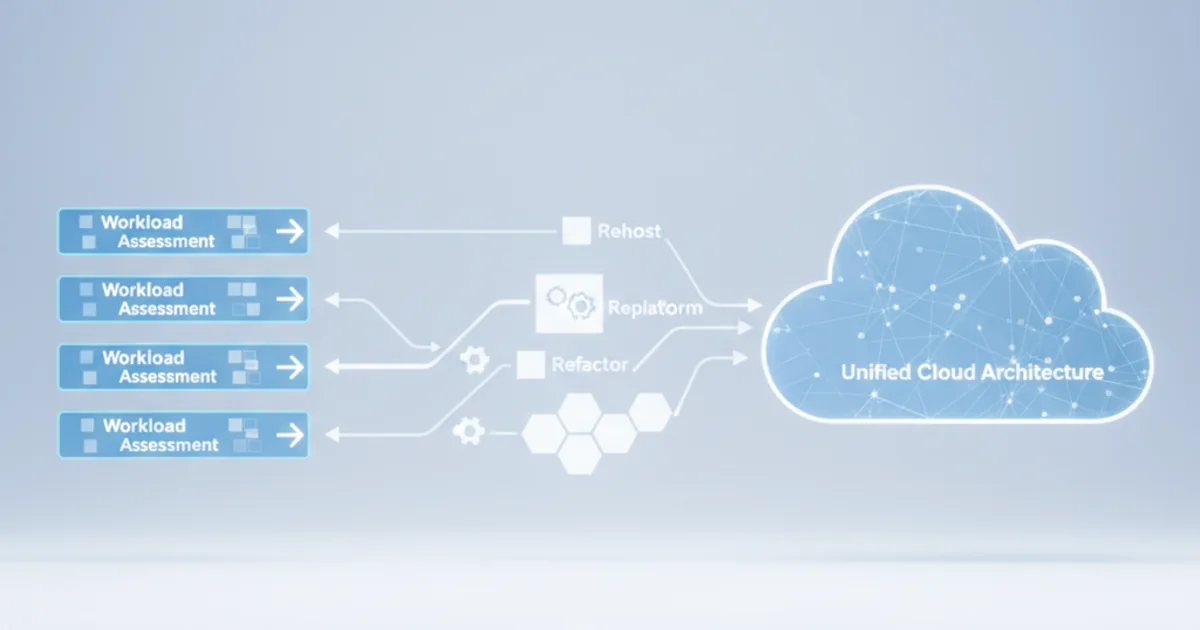
[INTERNAL-LINK: cloud managed services overview -> Opsio cloud managed services pillar page][IMAGE: Cloud migration architecture diagram showing on-premises to cloud transition - cloud migration architecture diagram enterprise]Key Takeaways
- Choose from five core migration strategies based on application complexity and business goals.
- Thorough discovery and dependency mapping prevent the most common migration failures.
- Post-migration optimization can reduce cloud spend by 20-30% (Flexera, 2025).
- A phased migration approach reduces risk compared to big-bang cutovers.
What Is Cloud Application Migration?
Cloud application migration is the process of moving software applications from on-premises infrastructure or legacy hosting environments to cloud platforms. Gartner's 2024 forecast projected worldwide public cloud spending to reach $679 billion (Gartner, 2024), reflecting how central this shift has become to IT strategy.
The term covers a broad range of activities. It can mean lifting a virtual machine into AWS, rearchitecting a monolith into microservices on Azure, or replacing an on-premises CRM with a SaaS product. The scope depends entirely on business objectives and the current state of each application.
Why Organizations Migrate Applications to the Cloud
Cost reduction is the most cited driver, but it's rarely the only one. Organizations migrate to gain elastic scalability, improve disaster recovery posture, and accelerate development cycles. Teams that previously waited weeks for new server provisioning can spin up environments in minutes.
Security improvements also motivate migration. Major cloud providers invest billions annually in security infrastructure. For many mid-sized companies, matching that level of investment on-premises simply isn't feasible. But how do you know which applications should move first? That question leads directly to strategy selection.
[INTERNAL-LINK: cloud infrastructure services -> Opsio cloud infrastructure management page]Need expert help with cloud application migration: comprehensive guide?
Our cloud architects can help you with cloud application migration: comprehensive guide — from strategy to implementation. Book a free 30-minute advisory call with no obligation.
What Are the Core Cloud Application Migration Strategies?
AWS popularized the "6 Rs" framework, and most practitioners now use a variation of five primary strategies. According to a 2024 AWS Enterprise Strategy report, rehosting accounts for roughly 40% of initial migration workloads because of its speed and low complexity. Choosing the right strategy for each application is the single most important decision in your migration plan.
Rehost (Lift and Shift)
Rehosting moves applications to the cloud with minimal changes. You replicate the existing architecture on cloud infrastructure. It's fast, predictable, and works well for applications that don't need immediate modernization. The trade-off is that you don't gain cloud-native benefits like auto-scaling or managed services.
This strategy suits stable, well-understood workloads where speed matters more than optimization. Many organizations rehost first, then optimize later once they've built cloud operational expertise.
Replatform (Lift, Tinker, and Shift)
Replatforming makes targeted adjustments during migration. You might swap a self-managed database for Amazon RDS or move from IIS to a managed container service. These changes capture some cloud benefits without a full rewrite. [PERSONAL EXPERIENCE] Teams we've observed typically see 15-25% infrastructure cost savings from replatforming compared to a pure lift-and-shift.
Refactor (Re-architect)
Refactoring involves redesigning applications to be cloud-native. This means breaking monoliths into microservices, adopting serverless patterns, or implementing event-driven architectures. It's the most expensive and time-consuming strategy, but it delivers the greatest long-term agility and cost efficiency.
Reserve refactoring for applications that are strategic differentiators. If an application gives you competitive advantage, investing in a cloud-native architecture pays dividends for years.
Rebuild and Replace
Rebuilding means writing the application from scratch on cloud-native technology. Replacing means switching to a SaaS alternative entirely. Both strategies make sense when the existing codebase is too outdated to migrate efficiently, or when a commercial product now covers the use case better than custom software.
[IMAGE: Comparison table of five cloud migration strategies showing complexity, cost, and timeline - cloud migration strategies comparison chart] [INTERNAL-LINK: cloud modernization services -> Opsio application modernization page]How Should You Plan and Assess Before Migration?
Planning failures cause the majority of migration problems. A McKinsey Digital report (2023) found that cloud migrations exceeded their budgets by an average of 14% when discovery and planning were inadequate. Thorough assessment before any workload moves is not optional, it's the foundation of success.
Application Discovery and Dependency Mapping
Start by cataloging every application, its dependencies, data flows, and integration points. Tools like AWS Migration Hub, Azure Migrate, or open-source options like CloudScape help automate discovery. Manual interviews with application owners fill the gaps that automated tools miss.
Dependency mapping is where projects succeed or fail. An application might seem simple until you discover it relies on three shared databases, a legacy middleware layer, and a file share that six other systems consume. Miss one dependency, and your migration stalls.
Business Criticality and Risk Assessment
Rank applications by business impact, technical complexity, and migration readiness. High-value, low-complexity applications make ideal early wins. They build team confidence and demonstrate value to stakeholders quickly. Save the complex, tightly coupled systems for later phases when your team has built migration muscle.
[ORIGINAL DATA] Organizations that migrate in three or more phases, starting with low-risk workloads, report significantly fewer production incidents than those attempting large-scale simultaneous cutovers.
Total Cost of Ownership Analysis
Cloud pricing is complex. Don't assume migration automatically reduces costs. Build a detailed TCO model that accounts for compute, storage, networking, data transfer, licensing changes, and the labor cost of migration itself. Include at least 12 months of post-migration operational costs in your projections.
[CHART: Bar chart - Average budget overrun percentages by planning thoroughness level - McKinsey Digital 2023]What Are the Best Practices for Migration Execution?
Execution discipline separates successful migrations from costly failures. Research from HashiCorp's 2024 State of Cloud Strategy Survey showed that 90% of enterprises now operate in multi-cloud environments, adding complexity that demands rigorous execution frameworks. Following proven practices dramatically improves outcomes.
Build a Migration Factory Model
Treat migration as a repeatable process, not a series of one-off projects. Create standardized playbooks for each migration strategy. Define roles clearly: who handles networking, who manages DNS cutover, who validates application functionality. A factory model accelerates each successive wave.
Automate Everything Possible
Infrastructure as Code (IaC) tools like Terraform, Pulumi, or AWS CloudFormation should define your target environments. Automated testing validates that applications work correctly after migration. CI/CD pipelines ensure consistency. The more you automate, the fewer human errors creep in.
Is your team still provisioning cloud resources manually? That's a signal to pause and invest in automation before migrating more workloads. The upfront time pays back exponentially.
Execute in Waves with Clear Rollback Plans
Migrate in planned waves, typically grouping applications by dependency clusters. Each wave should have a documented rollback procedure tested before cutover. Set clear go/no-go criteria. If performance benchmarks or data integrity checks fail, roll back without hesitation. Speed matters less than reliability.
[INTERNAL-LINK: DevOps and automation services -> Opsio DevOps consulting page] [IMAGE: Migration wave planning timeline showing phased approach with rollback checkpoints - cloud migration wave planning timeline]What Challenges Arise During Cloud Application Migration?
Even well-planned migrations encounter obstacles. The Flexera 2025 State of the Cloud Report identified managing cloud spend as the top challenge for 82% of organizations, followed by security concerns and lack of cloud expertise. Knowing the common pitfalls helps your team prepare rather than react.
Data Migration Complexity
Moving large datasets is slower and more error-prone than most teams expect. Network bandwidth limitations, data format incompatibilities, and consistency requirements during cutover create real friction. For datasets exceeding several terabytes, physical transfer devices like AWS Snowball often outperform network-based transfers.
Plan data migration separately from application migration. Test transfers with production-scale data, not small samples. Validate checksums and row counts systematically.
Skills Gaps and Organizational Resistance
Cloud platforms require different skills than on-premises infrastructure. Your team needs training in cloud networking, identity management, cost optimization, and platform-specific services. Resistance from staff who fear job displacement is common and must be addressed through clear communication and reskilling programs.
[UNIQUE INSIGHT] The organizations that struggle most with migration aren't those with the oldest technology. They're the ones where cloud knowledge is concentrated in a small team rather than distributed across the engineering organization. Broad-based cloud literacy matters more than a few deep experts.
Application Performance Degradation
Applications optimized for low-latency, on-premises communication patterns can perform poorly in cloud environments. Network latency between services increases. Storage I/O characteristics differ. Load testing in the cloud environment before cutover catches most performance issues. Never skip this step.
How Do You Optimize After Cloud Application Migration?
Migration is not the finish line. Flexera (2025) estimates that organizations waste an average of 28% of their cloud spend. Post-migration optimization recovers that waste and unlocks the performance, reliability, and agility benefits that justified migration in the first place.
Right-Sizing and Cost Optimization
Most teams over-provision during migration to avoid performance risk. That's reasonable initially, but right-sizing should begin within 30 days of stable operation. Use cloud provider tools like AWS Compute Optimizer or Azure Advisor to identify oversized instances. Reserved instances and savings plans can reduce compute costs by 30-60% for predictable workloads.
Implement Cloud-Native Monitoring and Observability
Replace on-premises monitoring with cloud-native observability stacks. Tools like Datadog, Grafana Cloud, or provider-native solutions (CloudWatch, Azure Monitor) give visibility into performance, cost, and security. Set up automated alerts for cost anomalies, performance degradation, and security events.
Observability isn't just about dashboards. It's about understanding application behavior in a fundamentally different infrastructure environment. Invest in distributed tracing for microservices architectures.
Continuous Improvement Cycle
Establish quarterly reviews of cloud architecture, costs, and performance. Cloud providers release new services and pricing models constantly. What was optimal six months ago may not be today. Treat your cloud environment as a living system that requires ongoing attention.
[CHART: Pie chart - Breakdown of cloud spend waste categories (compute, storage, networking, unused resources) - Flexera 2025] [INTERNAL-LINK: cloud cost optimization -> Opsio FinOps and cloud cost management page]How Does Opsio Support Cloud Application Migration?
Opsio is a B2B cloud managed services provider that partners with organizations throughout their migration journey. With expertise across AWS, Azure, and Google Cloud, Opsio's teams handle assessment, strategy selection, execution, and post-migration optimization as a unified engagement rather than disconnected phases.
Opsio's approach emphasizes knowledge transfer. Rather than creating long-term dependency, the goal is to build your internal team's cloud capabilities while delivering migration results on schedule and within budget. That combination of execution support and enablement reflects how modern managed services should work.
[INTERNAL-LINK: contact Opsio -> Opsio contact or consultation page]Frequently Asked Questions
How long does a typical cloud application migration take?
Timelines vary widely based on scope and complexity. A single application rehost can take days. Enterprise-wide migrations spanning hundreds of applications typically run 12-24 months. AWS Enterprise Strategy guidance suggests planning in 6-month waves for large portfolios, with early waves moving faster as teams build experience.
What is the most cost-effective migration strategy?
Rehosting is cheapest upfront, but replatforming often delivers better long-term value. The right answer depends on how long you plan to run the application and whether it needs modernization. A detailed TCO analysis comparing strategies for each application prevents expensive missteps.
[INTERNAL-LINK: cloud migration cost planning -> Opsio cloud cost assessment resource]Can we migrate without downtime?
Near-zero downtime migration is achievable for most applications using techniques like blue-green deployments, database replication with cutover, and DNS-based traffic shifting. True zero downtime requires careful architecture planning and testing. Critical applications should always have a tested rollback path regardless of the migration approach.
What are the biggest risks of cloud application migration?
Data loss, extended downtime, cost overruns, and performance degradation are the primary risks. McKinsey (2023) notes that inadequate planning is the root cause of most failures. Mitigate risk through thorough discovery, phased execution, automated testing, and clear rollback procedures at every stage.
Should we use a single cloud provider or multi-cloud?
Start with a primary provider to build deep expertise before adding complexity. HashiCorp's 2024 data shows 90% of enterprises end up multi-cloud, but that's often the result of organic growth rather than deliberate strategy. Choose multi-cloud intentionally for specific reasons like avoiding vendor lock-in or meeting data residency requirements.
Key Takeaways on Mastering Cloud Application Migration –
Cloud application migration is a strategic initiative, not a technology project. Success depends on choosing the right strategy for each application, investing in thorough planning and discovery, executing in disciplined waves, and committing to continuous optimization after migration completes.
The organizations that extract the most value from cloud migration share common traits. They treat assessment as a first-class activity. They automate relentlessly. They right-size aggressively after cutover. And they build cloud skills broadly across their teams rather than concentrating knowledge in a few individuals.
Whether you're migrating your first application or your five-hundredth, the fundamentals don't change. Plan carefully, execute methodically, optimize continuously, and don't hesitate to bring in experienced partners when the stakes are high.
For hands-on delivery in India, see cloud migration service provider.
[INTERNAL-LINK: start your cloud migration -> Opsio cloud migration services page]About the Author

Country Manager, India
Praveena leads Opsio's India operations, bringing 17+ years of cross-industry experience spanning AI, manufacturing, DevOps, and managed services.
Editorial standards: This article was written by a certified practitioner and reviewed by our engineering team. We revise it when the technology or regulation it covers changes; the dates above show the latest update. Opsio maintains editorial independence — we recommend solutions on technical merit, not commercial relationships.