Key Takeaways
- A cloud migration project plan aligns every workload move with measurable business outcomes such as cost reduction, agility, and compliance.
- Phased waves with clear rollback procedures reduce risk far more than a single big-bang cutover.
- Budget accuracy depends on accounting for dual-run costs, data-transfer fees, licensing changes, and FinOps governance from day one.
- Post-migration optimization, including right-sizing, reserved-capacity planning, and security hardening, determines whether the project delivers lasting ROI.
Why a Cloud Migration Project Plan Matters
A structured cloud migration project plan is the single most reliable way to prevent budget overruns, data-loss incidents, and extended downtime during a move to the cloud. According to Flexera's 2025 State of the Cloud Report, 82 percent of enterprises now operate in a multi-cloud environment, yet more than half cite cost management and governance as their top challenge. A documented plan turns those challenges into controlled risks.
Without a plan, teams default to ad-hoc decisions that compound into scope creep, missed dependencies, and security gaps. With one, every stakeholder, from the CTO approving spend to the engineer tagging resources, works from a shared playbook that maps objectives to execution milestones.
For organizations evaluating managed services support, Opsio's cloud migration services pair planning expertise with hands-on delivery across AWS, Azure, and Google Cloud.
Define Objectives and Secure Stakeholder Buy-In
Every successful migration starts by connecting the move to concrete business outcomes rather than treating it as a purely technical exercise. Common drivers include reducing data-center lease obligations, accelerating release cycles, meeting regulatory residency requirements, or enabling auto-scaling for seasonal traffic spikes.
To build alignment, translate each driver into a SMART goal. For example: "Migrate 80 percent of production workloads to a public cloud provider within 12 months, reducing infrastructure operating costs by 20 percent." Goals like these give the executive sponsor quantifiable success criteria and the project manager a scope boundary.
Stakeholder alignment checklist
- Executive sponsor signs off on budget envelope and success metrics.
- Application owners confirm migration wave assignments and downtime windows.
- Security and compliance teams approve the target architecture's control framework.
- Finance reviews the total cost of ownership (TCO) model and dual-run assumptions.
Build the Migration Team and Governance Model
The right team structure prevents ownership gaps that stall migration waves and inflate costs. A lean but cross-functional core team typically includes a project manager, cloud architect, network engineer, security lead, database administrator, and DevOps engineer. Application subject-matter experts rotate in as each wave begins.
Key roles and responsibilities
| Role | Primary Responsibility |
|---|
| Project Manager | Timeline, budget tracking, stakeholder reporting |
| Cloud Architect | Target architecture design, landing-zone setup |
| Security Lead | Identity, network segmentation, compliance mapping |
| Network Engineer | VPN/Direct Connect, DNS, firewall rules |
| DBA | Data replication, schema migration, integrity checks |
| DevOps Engineer | Infrastructure as Code, CI/CD pipelines, automation |
Governance and decision gates
Set up a steering committee that reviews progress at each wave boundary. Define go/no-go criteria covering performance test results, security scan outcomes, and rollback readiness before any production cutover proceeds. This prevents teams from pushing through migrations that have not met quality thresholds.
Assess the Existing Infrastructure and Application Portfolio
A thorough discovery phase eliminates the hidden dependencies and legacy constraints that cause migration failures. Begin with automated inventory tools such as AWS Application Discovery Service, Azure Migrate, or open-source alternatives like CloudScape. The goal is a complete asset register that includes servers, databases, storage volumes, network topology, and application interdependencies.
What to document during discovery
- Application inventory: Name, owner, technology stack, current hosting, and business criticality tier.
- Dependency map: Which services call which, including external API integrations and shared databases.
- Performance baselines: CPU, memory, storage IOPS, and network throughput under normal and peak loads.
- Compliance tags: Data residency requirements, PCI scope, HIPAA applicability, or GDPR processing records.
- Technical debt flags: End-of-life operating systems, unsupported middleware, or hardcoded IP addresses.
For a deeper dive into the assessment process, see our guide to cloud migration assessment tools and planning.
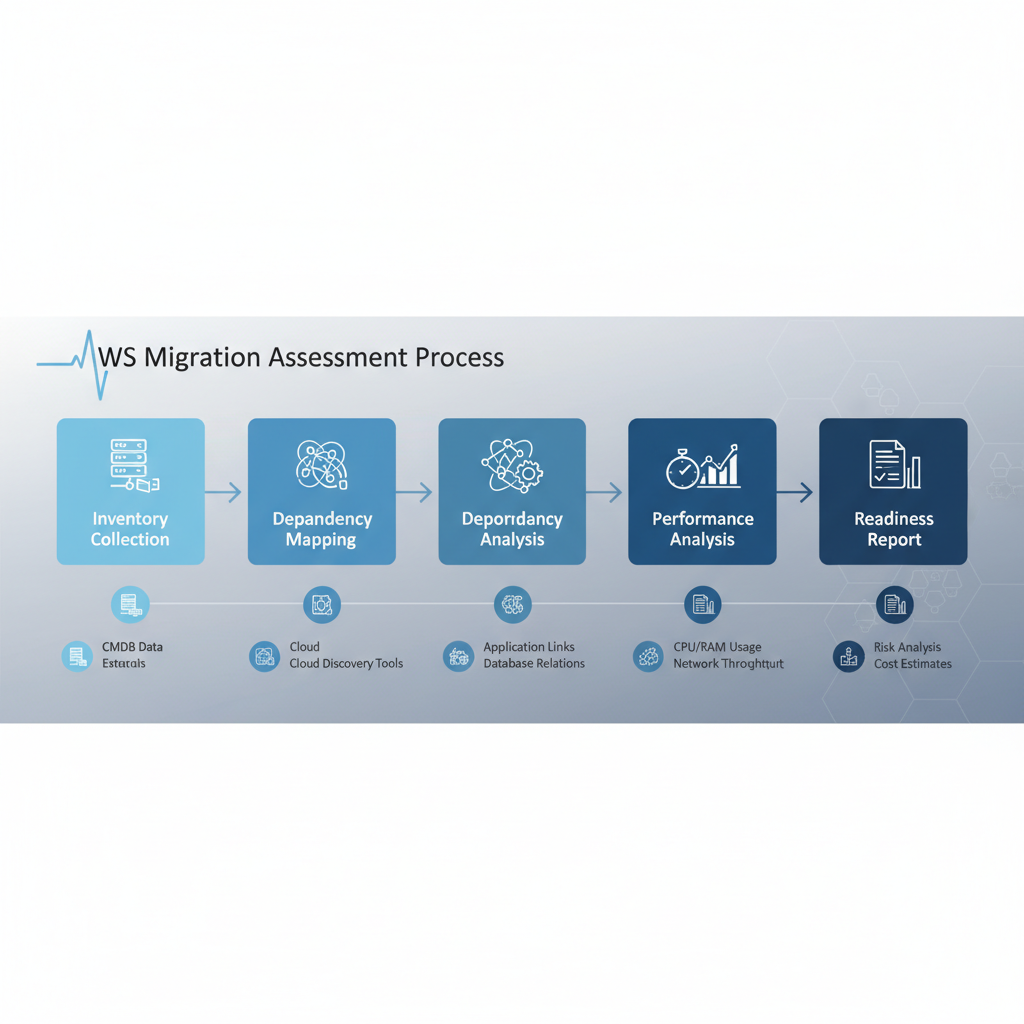 A cloud migration assessment moves from inventory collection through dependency mapping and performance analysis to a readiness report.
Choose the Right Cloud Migration Strategy
The 7 Rs framework gives every application in the portfolio a clear disposition, preventing wasted effort on workloads that should be retired or retained. Each "R" represents a different trade-off between speed, cost, and long-term architectural benefit.
The 7 Rs at a glance
- Rehost (lift and shift): Move the workload to cloud infrastructure with minimal changes. Fastest path, lowest immediate risk.
- Replatform: Make targeted optimizations, such as swapping a self-managed database for a managed service, without re-architecting.
- Refactor: Re-architect the application to exploit cloud-native capabilities like serverless compute or managed containers.
- Repurchase: Replace with a SaaS equivalent, for example moving from on-premises email to Microsoft 365.
- Relocate: Move to a different cloud region or provider using hypervisor-level migration with no application changes.
- Retain: Keep the workload on-premises, often because of latency requirements or recent capital investment.
- Retire: Decommission the application entirely, reducing the migration surface and ongoing costs.
Choosing between a lift-and-shift approach and deeper modernization depends on the application's strategic value. Our cloud migration strategy guide walks through decision criteria in detail.
Single cloud, multi-cloud, and hybrid models
A single-provider model simplifies operations and training. Multi-cloud reduces vendor lock-in and can satisfy data-sovereignty requirements by placing workloads in region-specific providers. Hybrid keeps latency-sensitive or compliance-restricted workloads on-premises while offloading elastic demand to the cloud. The right choice depends on your regulatory landscape, skill base, and tolerance for operational complexity.
Budget, Cost Controls, and ROI Planning
Migration budgets that ignore dual-run costs, data-egress fees, and licensing true-ups routinely overrun by 20 to 30 percent. A realistic financial plan accounts for every cost category from pre-migration consulting to post-migration FinOps tooling.
Common cost categories
| Category | Examples |
|---|
| Compute and storage | VMs, managed databases, object storage, snapshots |
| Networking | VPN tunnels, direct connect, data-egress fees |
| Licensing | BYOL conversions, SaaS subscriptions, OS licenses |
| Dual-run period | Parallel on-premises and cloud infrastructure |
| Professional services | Consulting, training, managed migration support |
| FinOps tooling | Cost-management platforms, tagging enforcement |
Preventing overruns with phased funding and FinOps
Release budget in tranches tied to wave completions. Assign a FinOps practitioner from wave one to monitor actual versus forecasted spend, flag anomalies within 48 hours, and recommend reserved-instance or savings-plan commitments once usage patterns stabilize. For a deeper look at controlling spend, review our cloud migration cost analysis guide.
Design the Target Cloud Architecture
The target architecture defines the landing zone, network topology, identity model, and security controls that every migrated workload inherits. A well-designed landing zone accelerates subsequent waves because shared infrastructure, guardrails, and pipelines are already in place.
Landing-zone essentials
- Account or subscription structure: Separate production, staging, and development environments using account-level isolation.
- Network design: Hub-and-spoke or transit-gateway topology with private subnets, NAT gateways, and explicit firewall rules.
- Identity and access: Federated single sign-on, least-privilege IAM policies, and break-glass emergency access procedures.
- Logging and monitoring: Centralized log aggregation, real-time alerting, and dashboards for cost, performance, and security events.
- Compliance baselines: Policy-as-code guardrails that enforce encryption-at-rest, tagging standards, and approved regions.
Build the Execution Roadmap
The execution roadmap translates the architecture and strategy decisions into a sequenced, time-bound delivery plan with clear go/no-go gates. Organize workloads into migration waves ordered by business criticality, dependency clusters, and risk tolerance.
Wave planning and timelines
Start with a proof-of-concept wave that migrates one or two low-risk, low-dependency workloads. Use this wave to validate tooling, runbooks, and rollback procedures. Subsequent waves increase in complexity and volume as the team builds confidence.
A typical enterprise migration of 50 to 200 workloads spans 6 to 18 months, depending on the mix of rehost versus refactor strategies. Build buffer time, usually 15 to 20 percent of the total timeline, for unplanned issues such as legacy application quirks or change-management delays.
Data protection, backups, and rollback plans
- Take verified, restorable backups of every workload before migration begins.
- Define rollback criteria: if latency exceeds baseline by more than X percent or error rates rise above Y, revert to the source environment.
- Maintain the source environment in a runnable state for at least two weeks after cutover to allow safe rollback.
- Encrypt data in transit and at rest using provider-managed or customer-managed keys, depending on compliance requirements.
Security and compliance controls
Embed security into the migration pipeline rather than bolting it on afterward. Run automated vulnerability scans on every migrated workload before opening production traffic. Map compliance controls, such as SOC 2 Type II, ISO 27001, HIPAA, or GDPR, to specific cloud-native services and configurations. For regulated industries, see our cloud migration in financial services guide.
Execute, Validate, and Optimize Post-Migration
Migration day is the halfway point, not the finish line; the real value emerges from post-migration optimization. After cutover, run validation tests that compare application response times, error rates, and data integrity against pre-migration baselines.
Validation checklist
- Functional tests pass for all critical user journeys.
- Performance meets or exceeds pre-migration baselines under load.
- Data row counts, checksums, or hash comparisons confirm integrity.
- DNS propagation is complete and SSL certificates are valid.
- Monitoring dashboards and alerting rules are active.
Ongoing optimization
Schedule a 30-day optimization review for every migrated workload. Check for oversized instances, underused storage volumes, and unattached elastic IPs. Convert stable workloads from on-demand to reserved instances or savings plans. Implement tagging policies to allocate costs by business unit and application.
For organizations that want continuous expert support, Opsio's managed cloud services provide ongoing monitoring, cost governance, and security management after migration.
 A cloud cost management dashboard breaks down spend by service, region, and resource tags.
Common Mistakes That Derail Cloud Migration Plans
Knowing the most frequent failure modes helps teams design safeguards before problems occur.
- Skipping the discovery phase: Undocumented dependencies surface during cutover and force emergency rollbacks.
- Treating every workload the same: Applying lift-and-shift to an application that needs refactoring wastes cloud spend without delivering cloud-native benefits.
- Ignoring change management: Operations teams unprepared for new tooling and processes create bottlenecks post-migration.
- Underestimating data-transfer time: Moving petabyte-scale datasets over network links takes weeks; plan for offline-transfer appliances when necessary.
- Deferring security: Retroactively applying security controls is slower and riskier than building them into the landing zone from the start.
Conclusion
A cloud migration project plan is not a one-time document; it is a living framework that evolves as discovery reveals new constraints and early waves generate operational lessons. The organizations that succeed treat planning as a continuous discipline, tightening budgets, refining rollback procedures, and optimizing architecture with every wave.
Start with clear objectives, build a cross-functional team, invest in thorough discovery, and commit to post-migration optimization. Whether you manage the journey in-house or partner with a cloud migration consulting firm, the quality of your plan determines the quality of your outcome.
FAQ
What should a cloud migration project plan include?
A comprehensive plan includes business objectives, a workload inventory with dependency mapping, a migration strategy for each application (using the 7 Rs framework), a phased execution roadmap with timelines and go/no-go gates, a budget covering dual-run and data-transfer costs, a security and compliance control matrix, rollback procedures, and post-migration optimization milestones.
How long does a typical enterprise cloud migration take?
Most enterprises with 50 to 200 workloads complete migration in 6 to 18 months. Smaller environments with fewer dependencies can finish in 8 to 12 weeks. The timeline depends on the mix of rehost versus refactor strategies, regulatory approval cycles, and the team's cloud maturity.
What are the biggest risks in a cloud migration project?
The top risks are undiscovered application dependencies, data loss or corruption during transfer, extended downtime beyond planned windows, budget overruns from unaccounted costs like licensing and data egress, security misconfigurations in the target environment, and organizational resistance to new operating models.
How do you control costs during a cloud migration?
Release budget in tranches tied to wave completions. Assign a FinOps practitioner from day one to track actual versus forecasted spend. Use tagging policies to attribute costs by business unit. Convert stable workloads to reserved instances or savings plans once usage patterns stabilize. Monitor for idle resources and oversized instances weekly during the first 90 days.
Should we use a single cloud provider or go multi-cloud?
A single provider simplifies operations, training, and support. Multi-cloud reduces vendor lock-in and can address data-sovereignty requirements by placing workloads with region-specific providers. Hybrid keeps latency-sensitive or compliance-restricted workloads on-premises. Choose based on your regulatory landscape, existing skill base, and tolerance for operational complexity.
What is the difference between rehosting and refactoring?
Rehosting (lift and shift) moves an application to cloud infrastructure with minimal code changes, offering the fastest migration path. Refactoring re-architects the application to use cloud-native services like serverless compute or managed containers, delivering better scalability and cost efficiency over time but requiring more development effort upfront.
How do we ensure data security during and after migration?
Encrypt data in transit and at rest. Use federated identity with least-privilege access policies. Run automated vulnerability scans on every workload before opening production traffic. Map compliance controls to specific cloud-native services. Maintain centralized logging and real-time alerting. Conduct post-migration security audits within 30 days of cutover.
When should we involve a managed service provider?
Engage a managed service provider when in-house teams lack deep cloud expertise, when the migration timeline is aggressive, or when the organization needs ongoing operational support after migration. An MSP provides pre-built landing zones, proven runbooks, and 24/7 monitoring that accelerate delivery and reduce risk.
Opsio provides cloud migration services and cloud consulting to help organizations implement and manage their technology infrastructure effectively.